Copas
Copas
A native, fast, and privacy-first clipboard manager for macOS.
Everything you copy, kept, searchable, and one keystroke away.
Why Copas?
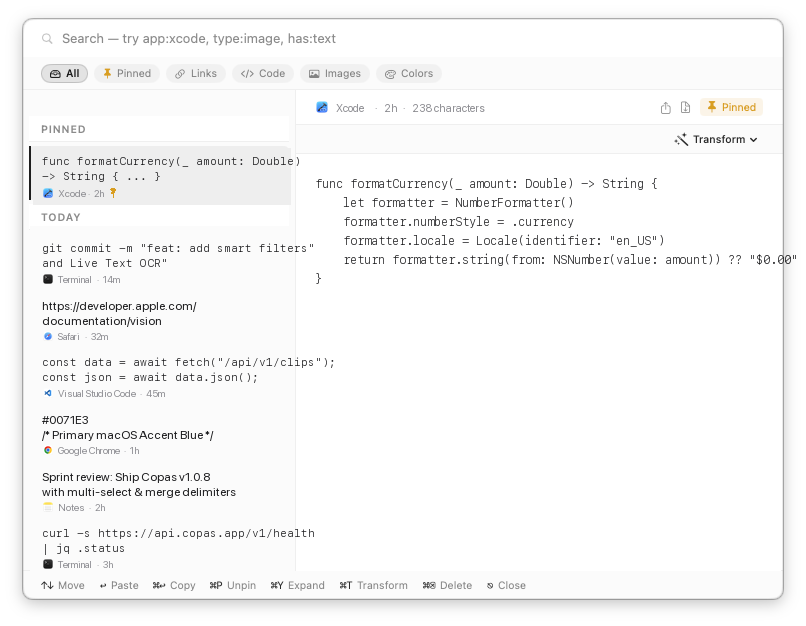
Copas lives discreetly in your menu bar. When you need something you copied earlier, press ⇧⌘V:
- Everything in one place: Text, formatted rich text, code snippets, colors, and pictures — listed chronologically down the board and grouped by day.
- Instant paste: Arrow to any clip or click it, press ↩ Return, and it pastes straight into whatever you were just typing in.
- Instant search: Start typing anywhere on the board to search across your whole history, including text recognised inside screenshots.
Features
Deep Search & Live Text OCR
Searches full clip content and source apps. Recognises text inside screenshots and pictures on-device via Apple Vision, so receipts and error dialogs are findable by what they say.
Screen to Image or Text
Capture any screen region directly. Press ⇧⌘1 for an image clip, or ⇧⌘2 to extract the text straight to your clipboard.
Pinned Clips
Pin essential code snippets, boilerplate, or addresses with ⌘P. Pinned clips stay permanently at the top of your board, immune to retention pruning.
Smart Filter Pills
Filter instantly with one click or shortcuts: All (⌘⌥0), Pinned (⌘⌥1), Links (⌘⌥2), Code (⌘⌥3), Images (⌘⌥4), or Colors (⌘⌥5).
15 Text Transforms
Press ⌘T to clean or format snippets on the fly: Case conversion, JSON formatting, URL/Base64 encoding, HTML escaping, line sorting, and duplicate removal.
Multi-Select & Merge
Select multiple clips with ⌘-click or Shift-click. Press ⌘M to merge them using custom delimiters (newlines, commas, tabs, spaces) or export as a file.
Pin-to-Screen Scratchpad
Press ⌘⇧P to keep Copas floating on screen. Effortlessly paste multiple clips sequentially into documents or spreadsheets without the board dismissing.
Draggable Window
Move the Copas board anywhere on screen across displays using the top capsule drag handle, search bar margins, or bottom status bar.
Direct Drag & Drop
Drag images or text clips directly from the board into Finder, Slack, Discord, Mail, Figma, or web editors without closing the window.
Native Sharing & Export
Right-click any clip to Share via AirDrop, Messages, Mail, Notes, or Reminders, or export to disk as .txt, .json, .md, or .png.
Insights & Storage Stats
Explore your clipboard statistics in Settings: text vs. image breakdown, storage footprint, and top source applications.
Privacy by Design
Copas is engineered from the ground up to respect your privacy:
- 100% On-Device: Zero accounts, zero sync, zero trackers, and zero telemetry.
- Private Content Shield: Anything copied from password managers (such as 1Password, Bitwarden, Apple Keychain) or marked as concealed is never read, never hashed, and never written to disk.
- App Exclusion: Exclude any sensitive app manually in Settings → History.
- Local OCR: Optical character recognition is processed strictly on your Mac using native macOS Vision and Live Text APIs.
Keyboard Shortcuts
| Shortcut | Action |
|---|---|
| ⇧⌘V | Show / toggle the Copas board |
| ⇧⌘1 | Capture screen region as image |
| ⇧⌘2 | Capture screen region and extract text to clipboard |
| Type anywhere | Search clips and OCR image text |
| ↑ ↓ | Move between clips |
| ⌥↑ ⌥↓ | Jump a day at a time |
| ↩ Return | Paste into active app |
| ⌘↩ | Copy to clipboard without pasting |
| ⌘1 – ⌘9 | Paste the nth clip immediately |
| ⌘⇧P | Pin or unpin board to screen (scratchpad mode) |
| ⌘P | Pin or unpin focused clip |
| ⌘M | Merge selected clips |
| ⌘T | Open text transform menu |
| ⌘S | Save edited clip |
| Space / ⌘Y | Quick Look / expand clip preview |
| ⌘⌫ | Delete focused or selected clips |
| ⌘⌥0 – ⌘⌥5 | Filter: All (0), Pinned (1), Links (2), Code (3), Images (4), Colors (5) |
| ⌘, | Open Preferences / Settings |
| Esc | Clear search / selection, or dismiss board |
Installation & Requirements
System Requirements
- macOS 14.0 (Sonoma) or later (fully compatible with macOS 15 Sequoia)
- Universal Binary: Runs natively on Apple Silicon (M1/M2/M3/M4) and Intel Macs
Install via DMG
- Download the latest release
.dmgfrom GitHub Releases. - Open the disk image and drag Copas.app to your Applications folder.
- Launch Copas from Applications or Spotlight.
Permissions
Copas prompts for permissions only when needed:
- Accessibility: Required to simulate ⌘V for instant pasting into your active application.
- Screen Recording: Optional; requested only when you trigger screen region capture (⇧⌘1 or ⇧⌘2).
Updates & Appcast Feed
Copas includes automatic update support powered by Sparkle. Updates are notarized by Apple and cryptographically signed with EdDSA.
The permanent update feed is hosted on this site:
https://sigitkusuma.github.io/copas/appcast.xml
You can check for updates manually at any time via Copas Menu Bar Icon → Check for Updates….
Building from Source
# Clone the repository
git clone https://github.com/sigitkusuma/copas.git
cd copas

# Generate Xcode project with XcodeGen
brew install xcodegen
xcodegen generate

# Open and build
open Copas.xcodeproj
See CONTRIBUTING.md for code style guidelines and test suite details.
License
Copas is free and open source software released under the MIT License.